Flutter apps usually run a few things before runApp: Firebase init, dependency injection, loading caches, etc. If any of them throws an exception, runApp is never called, and the app hangs on the native splash screen forever. The user thinks the app is dead. And since crash reporting is set up during that same init, you may never hear about it.
So, whatever you run before runApp, put it in a try/catch. When it fails, send the error to a critical reporting system (for example, a Telegram bot) and show a launch failure view instead. A Bootstrap class that always ends in runApp holds that logic:
abstract final class Bootstrap { static Future<void> run(Widget Function() builder) async { WidgetsFlutterBinding.ensureInitialized(); try { // Firebase, DI, caches, whatever you have } catch (error, stackTrace) { // let the user know runApp(const LaunchFailureApp()); // let yourself know LaunchFailureReporter.report(error: error, stackTrace: stackTrace); return; } runApp(builder()); }}
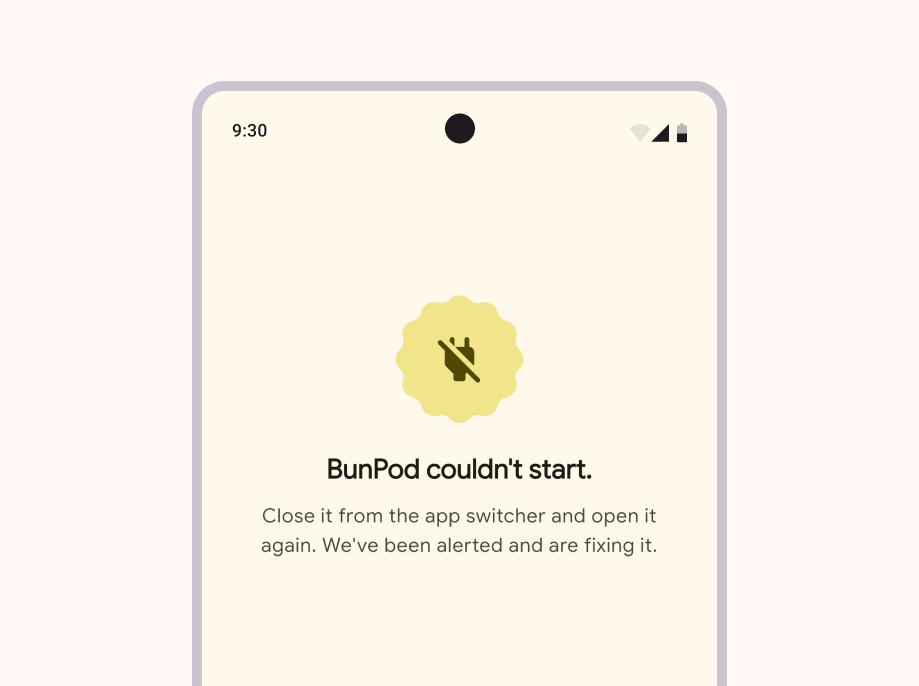
LaunchFailureApp is a simple static MaterialApp with a copy that tells the user what happened and what to do, like "The app couldn't start. Close it from the app switcher and open it again. We've been alerted and are fixing it." Here's how it looks in BunPod:
LaunchFailureReporter follows the same rule. A plain HTTP request to anywhere that reaches you, a Telegram bot, a Slack webhook, your own API.