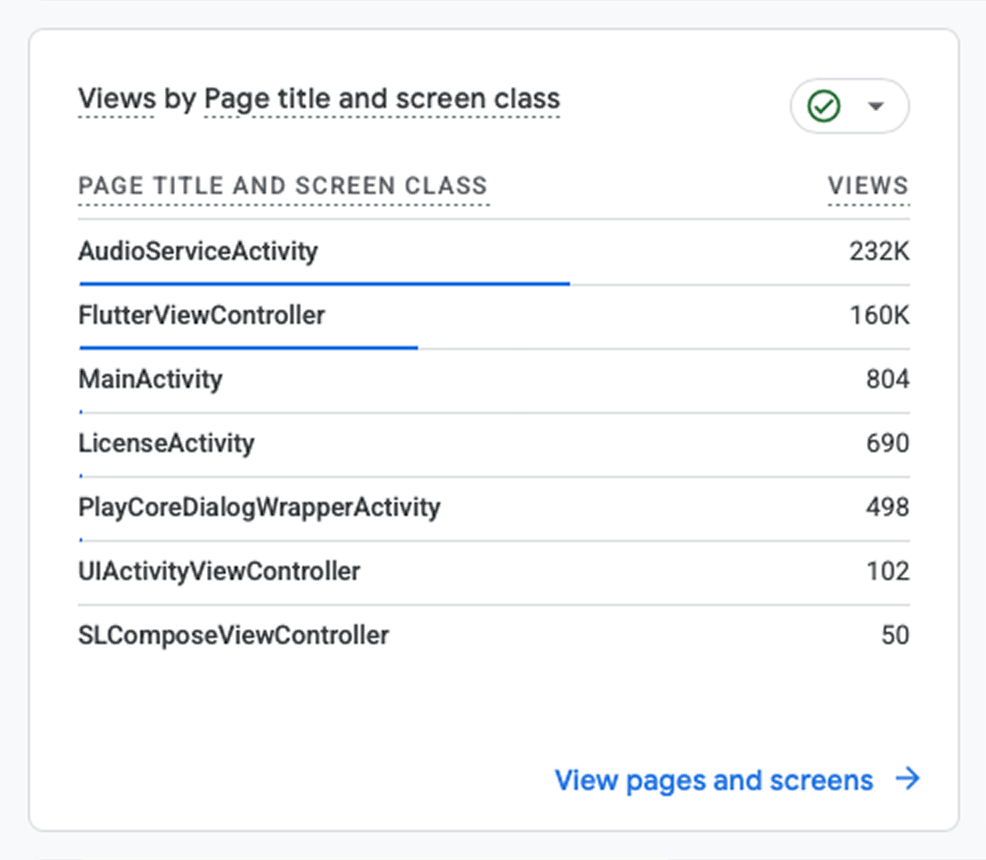
Analytics tools often show a Flutter app as one screen. Every page gets counted as FlutterViewController.
Here's an example from Google (Firebase) Analytics:
That FlutterViewController row is the native view Flutter draws your whole app into. Analytics SDKs track native views, and your app only has this one. So the SDK can't detect your pages at all.
The native reporting is just noise, so turn it off first. For Firebase:
It reports the route's settings.name on every push and pop. No name, no event. So the job is to name every route.
Named routes already have one. pushNamed('/cart') reports as /cart.
go_router fills it from the route's name or path. Pass the observer to GoRouter(observers: [...]) instead of MaterialApp. Two edge cases here. With a custom pageBuilder you build the page yourself, so set its name too:
Dialogs and bottom sheets are mostly not worth tracking as screens. If one is, log a screen view event manually when it opens. You can also pass routeSettings to showDialog and showModalBottomSheet, but check your SDK first. FirebaseAnalyticsObserver, for example, skips non-page routes by default, and its routeFilter parameter controls that:
FirebaseAnalyticsObserver( analytics: FirebaseAnalytics.instance, routeFilter: (route) { return route is PageRoute || route is DialogRoute || route is ModalBottomSheetRoute; },)